
Everyday device controls
Manage camera access and outgoing-call restrictions on supported, fully managed phones. Emergency calling remains available.
YOUR ANDROID WORKSPACE
Bring your phones, everyday controls and device plans together. Thoughtful tools for the devices you own or have permission to manage.
v0.18.0 preview · Android 8+ · 3.2 MB APK
Clear permissions. Visible management.
Control with the phone user’s knowledge.
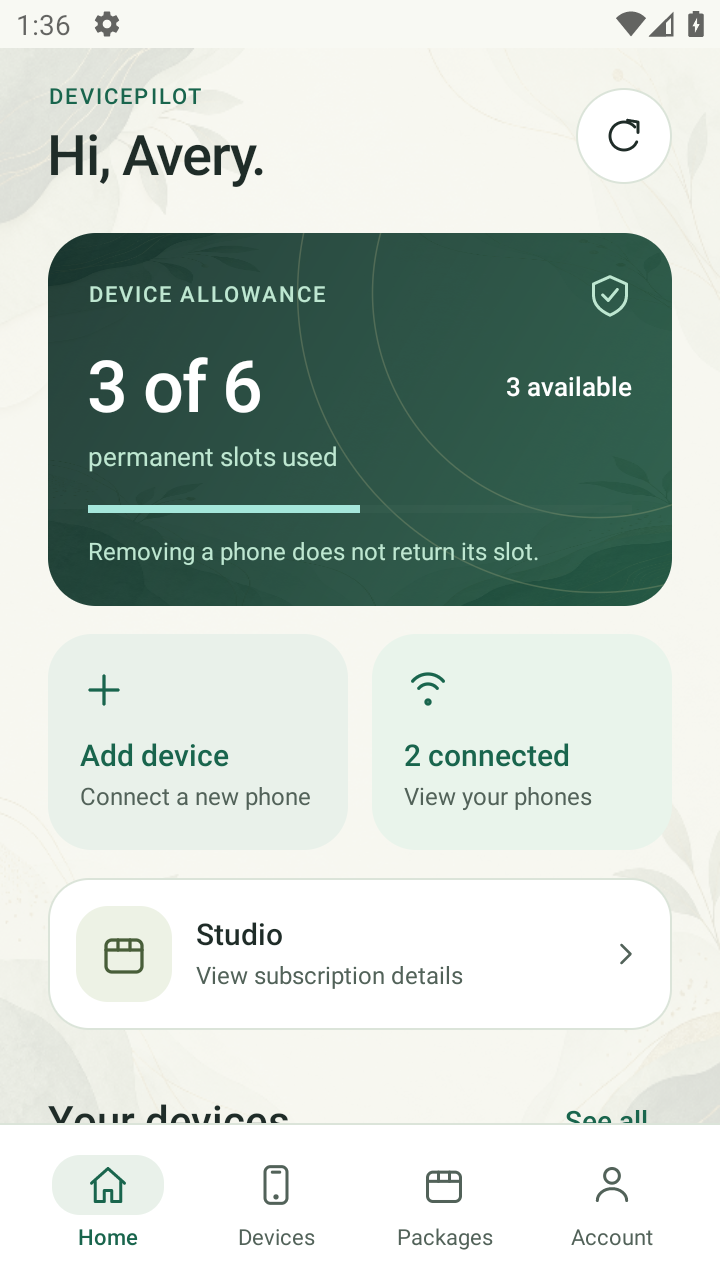
APP PREVIEW · DEMONSTRATION DATA
PURPOSEFUL TOOLS
Find the right control, understand its state, and take the next step. All from your Android app.
Keep an eye on your connected phones, reported settings and device allowance without switching between tools.
See inside DevicePilotManage camera access and outgoing-call restrictions on supported, fully managed phones. Emergency calling remains available.
Use supported lock controls and a visible owner message. Keep restore and recovery options within reach.
Show or hide eligible user apps and manage approved uninstall protection. Management and essential system apps stay visible.
Request a location after the target user enables sharing. See when it was reported and its accuracy; the user can stop sharing.
View available device information and connection reports. Android permissions and manufacturer support determine the details available.
Restore supported features or release management. Subscription expiry never triggers a phone lock.
Advanced controls require Android Device Owner enrollment on an eligible new or reset phone. Features vary by Android version and manufacturer. Pairing alone does not enable system controls.
A CLOSER LOOK
A calm workspace that keeps the important things easy to find. Explore the screens below.
FROM SETUP TO EVERYDAY USE
A clear account, an authorized connection, and controls that reflect what the phone supports.
Install DevicePilot on your main phone. Sign in or create an account when registration is available, then see current packages in the app.
Install on the target phone and pair using its setup flow. For advanced management, follow QR enrollment on an eligible new or reset phone.
Complete the required approvals on the target. Open its controls in your main app, check reported results, and restore or release when needed.
DESIGNED AROUND TRUST
Useful controls need understandable boundaries. DevicePilot keeps permissions, device capacity and recovery part of the experience.
Supported enterprise controls use Android Device Owner capabilities. Enrollment is an explicit setup step.
HTTPS connects the app to its service. Remembered sign-in tokens are stored using the app’s encrypted storage.
Location sharing and sensitive approvals involve the target phone user. Essential management remains visible.
Restore and authorized release are available without using payment expiry to lock a phone.
ROOM FOR YOUR DEVICES
Choose by target-device capacity and included features. See current package names, prices and availability directly in the app.
A one-target signup trial, when enabled, lets eligible new customers get to know DevicePilot.
Find a package with the target-device allowance and supported features that fit your needs.
View available upgrades or additional device slots as your device needs change.
A paired phone uses a permanent registration slot. Removing it does not return that slot; reconnecting the same remembered device does not use a new one. Available upgrades and purchase methods are shown in the app.
BEFORE YOU BEGIN
The details that make getting started easier.
The preview app requires Android 8.0 or later and an internet connection. Use it only on devices you own or are authorized to manage. Advanced controls require Device Owner enrollment; support varies by Android version and manufacturer.
No. Pairing connects a phone to your account. System-level controls require eligible Device Owner enrollment, usually during setup of a new or intentionally reset phone, plus any required target-phone approvals. Back up data before choosing to reset a phone.
Ordinary installation needs approval on the target phone. Android’s managed-device setup can download the app during authorized enrollment. DevicePilot does not offer covert installation, invisible management, carrier IMEI blocking or physical SIM-slot power controls.
Open the APK on your Android phone and follow Android’s installation and security checks. Your browser may require installation permission. This is a preview build for evaluation, not a Google Play release. If Android flags the file, stop and verify the release; keep security checks enabled. A compatible existing installation also needs a matching signing key.
When the signup trial is enabled, its default allowance is one target for seven days. At expiry, trial restrictions are scheduled to restore automatically when the target can run the recovery process. Expiry never triggers a new lock. Keep the phone connected so it can receive and report updates.
Open Packages in the customer app for current package details, device allowances and available upgrade or purchase options. This website does not process payments. A used permanent registration slot is not returned when a phone is removed.
No. Controls depend on Android version, enrollment status, approvals and manufacturer support. Device information can be limited by the operating system. Global location switching requires supported managed devices on Android 11 or later; location sharing still requires the target user’s approval. Settings reset restrictions do not prevent hardware or recovery-mode resets.
YOUR NEXT STEP
Explore DevicePilot’s Android workspace and discover the current packages in the app.
Download Android previewThis APK is a preview build signed with the existing development testing key. It is intended for evaluation. Server setup, enrollment and device support affect feature availability.
e0325a86942a0b429d7da3d25e5e0644992ab5b8c55a79853714ef410bb5d405